

“When I type my website in, it shows up. So everyone can see it on Google.” I hear this all the time, and it’s not quite true.
Typing your address in the browser just opens the page. It doesn’t prove Google has it. A customer searching for what you sell only sees your page if Google has found it, stored it (indexed it), and chosen to show it. Google Search Console is the free tool that tells you which of those happened.
“But it shows up when I type it in”
Three different things get mixed up here:
- Typing your address opens your site directly. Google isn’t involved at all.
- Searching your own business name can bring up your site because the search is so specific, and because Google customizes results around your search history and location. It doesn’t mean you show up for anything else.
- A customer searching “med spa salinas” only sees your page if Google has crawled it, indexed it and decided it’s a good answer. Until a page is indexed, Google won’t show it in results, period.
That’s the same crawl, index and serve pipeline from how Google Search works. Search Console is where you see each stage for your own site.
Why every Digital Vibes site gets Search Console
Our rule is simple: every website we build gets Google Search Console and Google Analytics. No exceptions.
Search Console shows which pages are indexed and which aren’t, and why. That’s how we catch problems and fix them before they cost weeks of traffic. The bonus is real search data: the actual searches that showed your site, how often you appeared, your average position and how many people clicked. We use that to build content around what people already search, instead of guessing.
What is Google Search Console?
It’s Google’s free tool for seeing your site the way Google Search sees it: what’s indexed, what searches show it and what’s broken. You don’t need it to appear on Google, but without it you won’t know why you don’t.
Google Search Console vs Google Analytics
| Google Search Console | Google Analytics (GA4) | |
|---|---|---|
| Answers | How does Google see my site? | What do visitors do on my site? |
| Timing | Before the click | After the click |
| Key data | Searches, impressions, clicks, position, indexing, errors | Users, sessions, pages viewed, key events, channels |
| Covers | Google Search only | All traffic sources |
| Cost | Free | Free |
The short version: Search Console gets people to your door; Analytics tells you what they do inside. Our Google Analytics lesson covers the inside.
A real example: 16 months, 0 clicks
I own salinasvalleymarketing.com and never worked on it. It’s a basic “Coming Soon” page, and it’s been live for well over a year. Here’s what Search Console says about it.
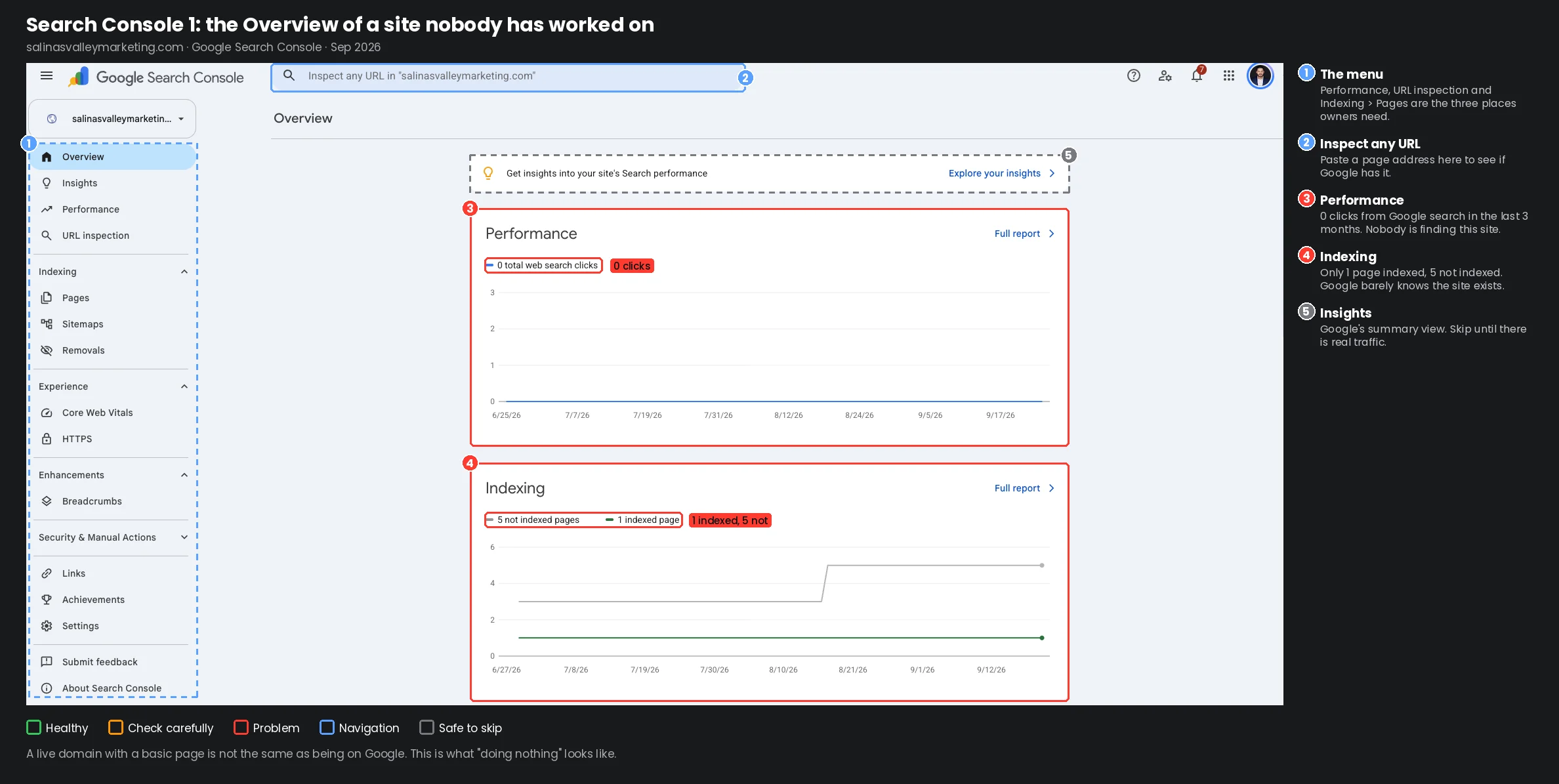
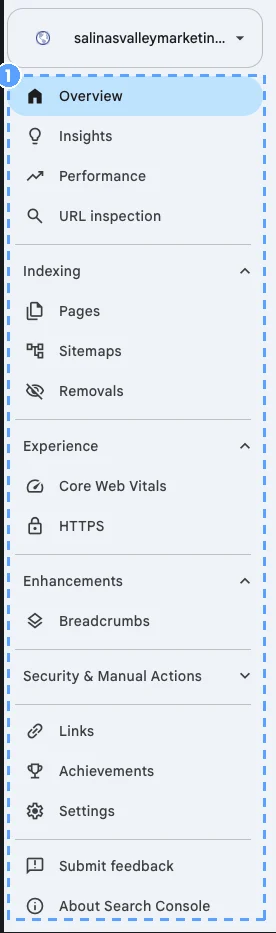
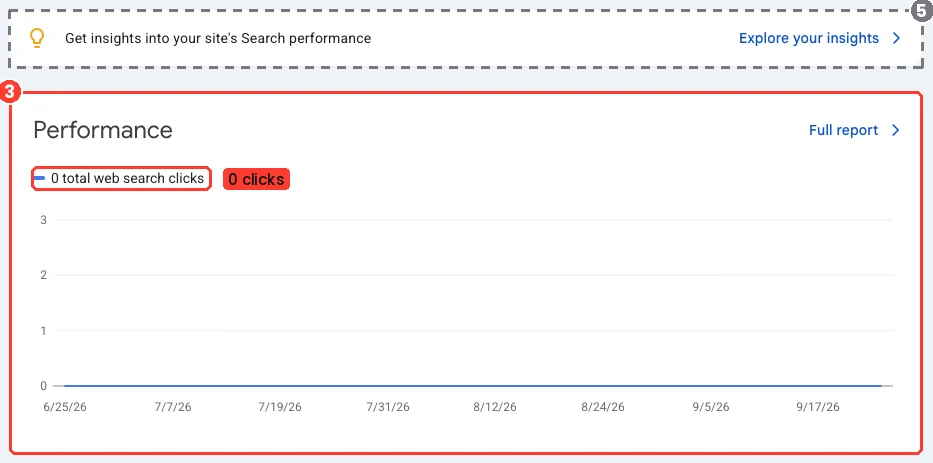
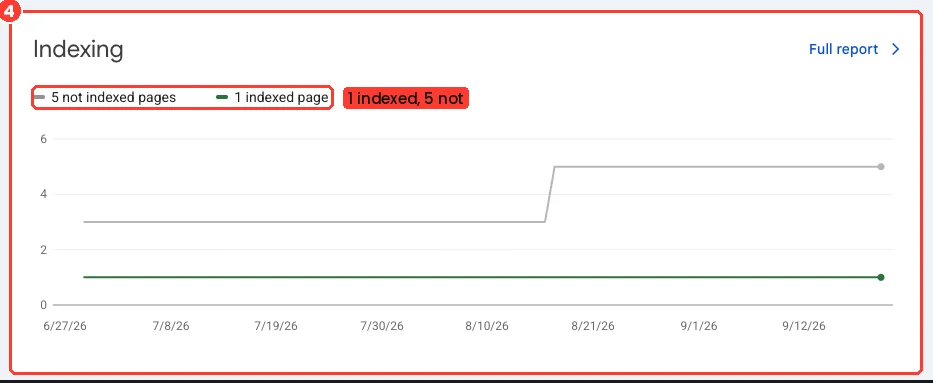
Screen 1, the Overview (the graphic at the top): 0 clicks from Google search in the last 3 months, 1 page indexed and 5 not indexed. The site loads fine. Google just barely knows it exists.
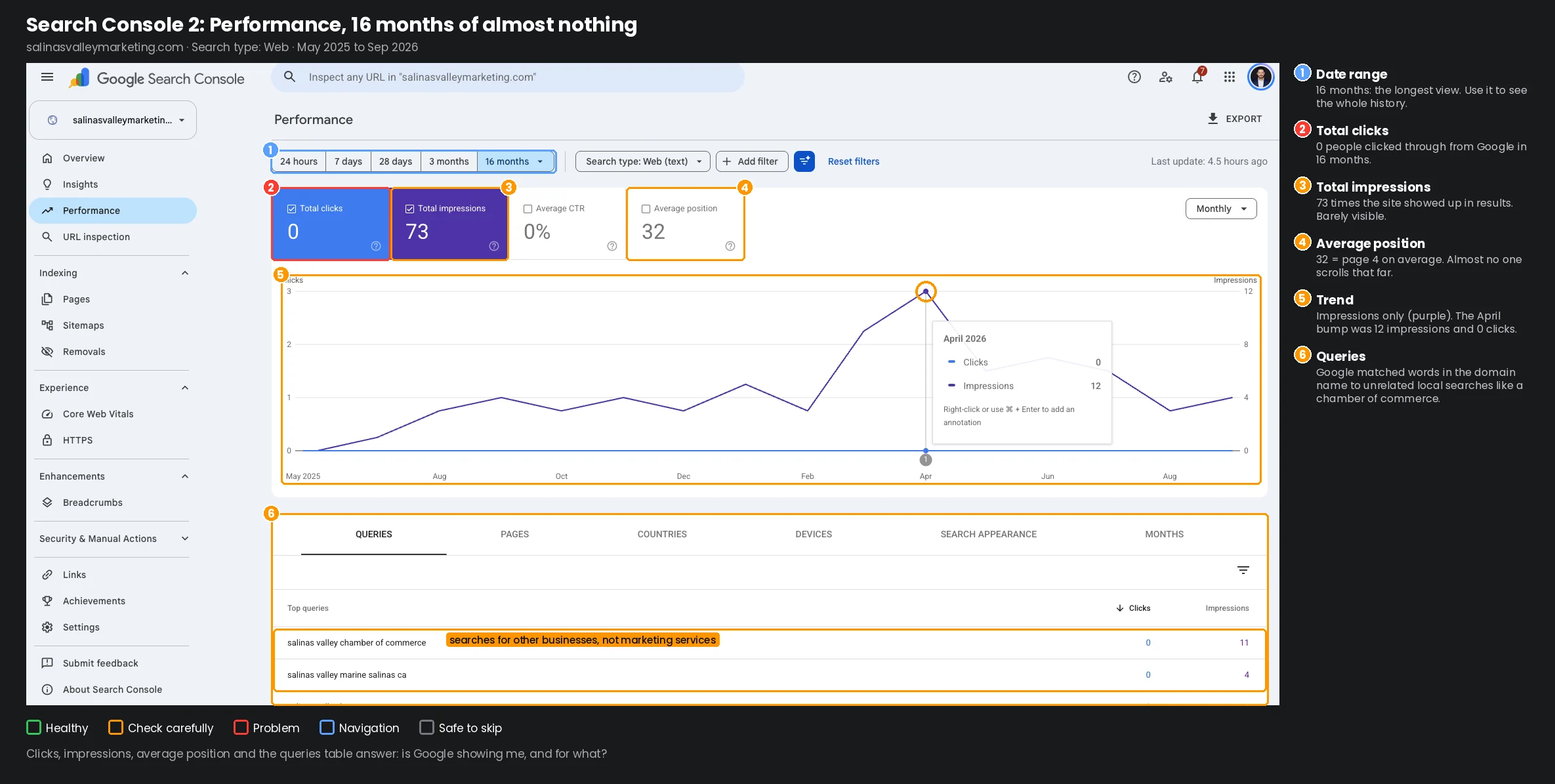 Date range 16 months is the longest view Search Console keeps. Use it to see the whole history. Total clicks: 0 Nobody clicked through from a Google search in 16 months. This is the number that means visitors. Total impressions: 73 The site showed up in Google results 73 times in 16 months. That’s barely visible. Average CTR: 0% Clicks divided by impressions. With 0 clicks it can only be 0%. Average position: 32 Around page 4 of the results, on average. Almost nobody scrolls that far. The trend Impressions only (purple). Clicks never leave zero. The April “peak” The best month in 16 was April 2026: 12 impressions, 0 clicks. Queries The actual searches that showed the site. This is where content ideas come from once a site has real pages.
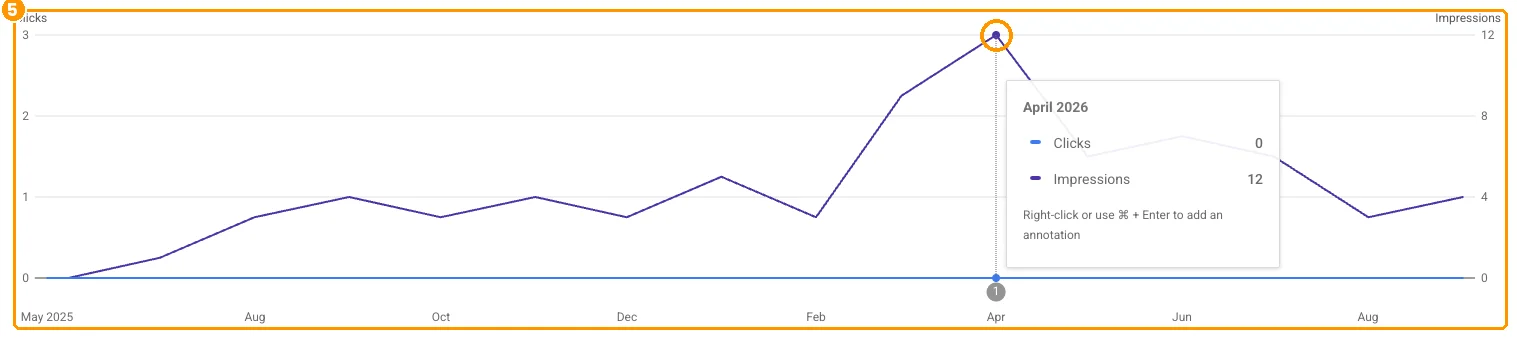

Clicks, impressions, average position and the queries table answer one question: is Google showing me, and for what?
Google Search Console Performance report, salinasvalleymarketing.com, web search, May 2025 to September 2026.
This is screen 2, the Performance report. Hover over any part for a quick explanation, or click it and the AI walks you through it.
Screen 2, Performance, over 16 months: 0 clicks, 73 impressions, 0% click-through rate, average position 32. Position 32 is around page 4 of the results, where almost nobody looks. The best month was April 2026, with 12 impressions and still 0 clicks.
Then look at the queries. The top two are “salinas valley chamber of commerce” and “salinas valley marine salinas ca”: searches for other businesses. With no real content, the only thing Google could match was words in the domain name.
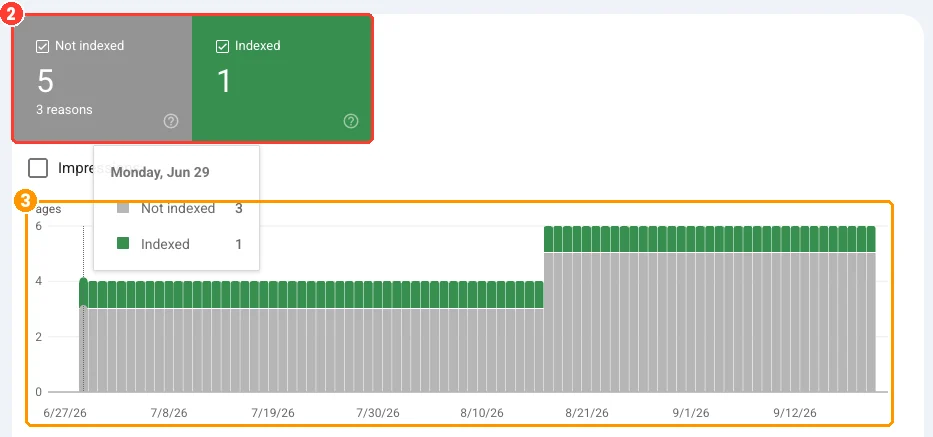
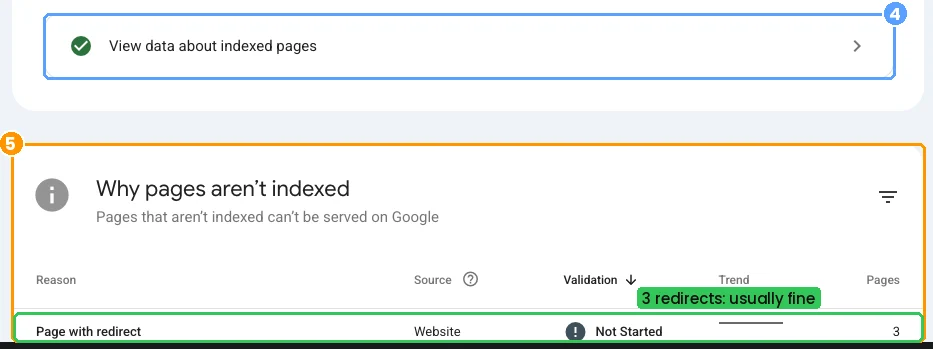
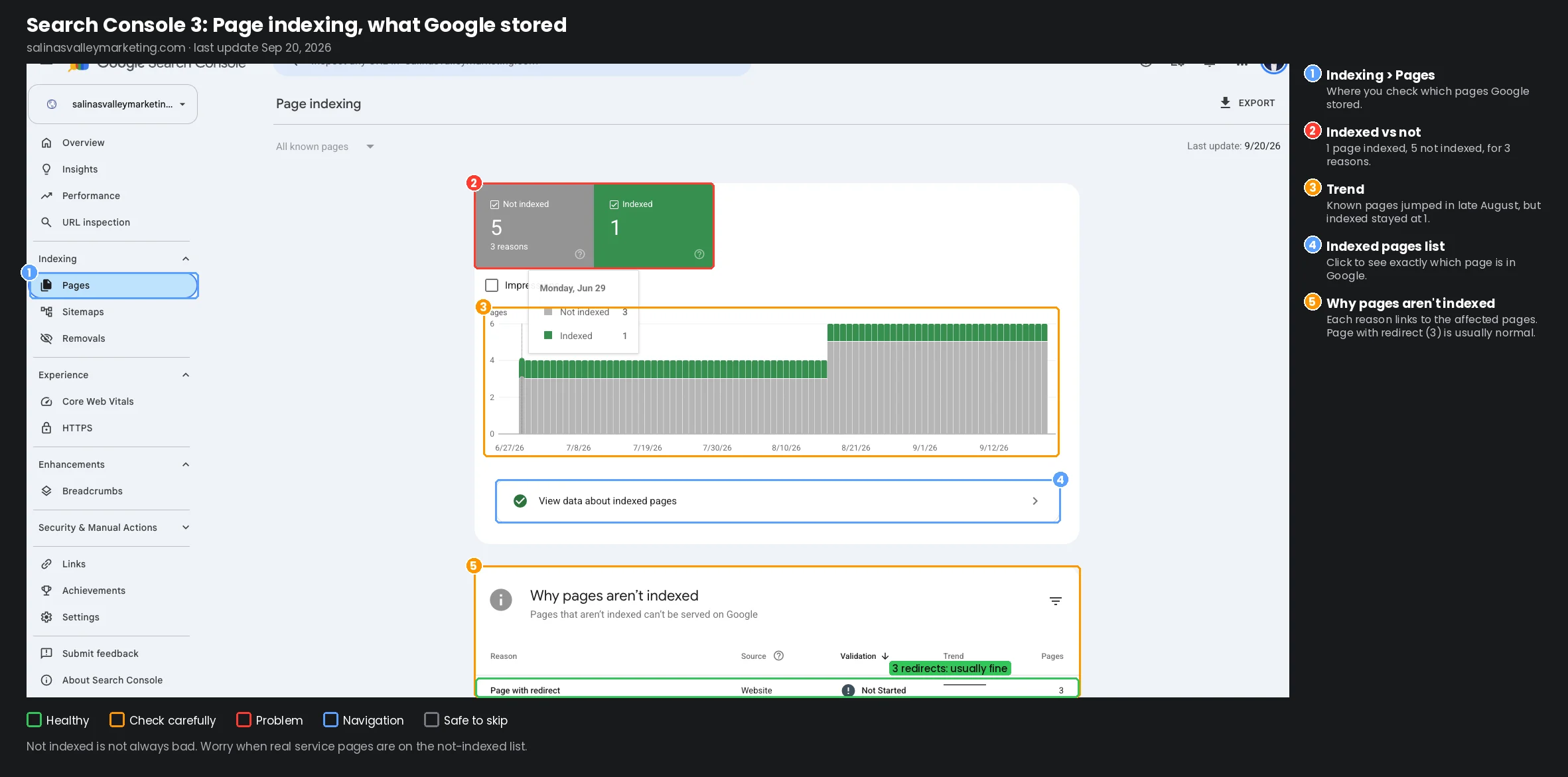 Indexing, then Pages Where you check which pages Google has stored. 1 indexed, 5 not Google knows about 6 addresses on this site and stored only 1. Not indexed pages can’t show up in Google at all. The trend Known pages jumped in late August, but indexed stayed at 1. Google found more and stored nothing new. The indexed pages list Click to see exactly which page is in Google. Why pages aren’t indexed Each reason links to the pages it affects. Read the reasons before you panic about the number. Page with redirect (3) Usually fine: here the http:// and www. versions forward to the main address, so Google stores the main one only.
Not indexed isn’t always bad. Worry when real service pages are on the not indexed list.
Google Search Console Page indexing report, salinasvalleymarketing.com, last update September 20, 2026.
This is screen 3, Page indexing. Hover over any part for a quick explanation, or click it and the AI walks you through it.
Screen 3, Page indexing: 1 page indexed, 5 not indexed for 3 reasons. In late August Google found more addresses, but the indexed count stayed at 1. The visible reason, “Page with redirect” (3 pages), is normal here: the http:// and www. versions of the address forward to the main one, so Google stores the main one only.
Google showed this site 73 times in 16 months and sent zero visitors. That’s what “I have a website” looks like without Search Console and without real content.
How to get your website indexed on Google in 3 steps
Setup takes about 15 minutes if you can get into your domain settings. We do it for every client, and we’ll do it for you if you’d rather not.
- Add and verify your site. A Domain property covers your whole domain, with and without www and https, and is verified with a DNS record at your domain provider. That’s our default. A URL-prefix property covers only addresses that start with the exact address you enter, and has more ways to verify. A common reason for “no data” is setting it up for http:// when the site runs on https://.
- Add users instead of sharing passwords. The business owner should always stay a verified owner. Your web team gets its own access, full or restricted, and you can remove it any time.
- Submit your sitemap. A sitemap is the list of pages you want Google to find; most website platforms make one for you, often at /sitemap.xml. It helps Google discover your pages, but it doesn’t guarantee they get indexed. Links between your pages do most of the work; see how crawlers find your pages.
For a new or updated page, paste its address into URL inspection at the top of Search Console and click Request indexing. That asks Google to crawl it again. It doesn’t force the page into results, and there’s a daily limit, so use it for pages that matter.
The Search Console reports that matter
The first three answer almost every question. The rest are for when something looks wrong.
| Report | Where | What it tells you | What to do |
|---|---|---|---|
| Performance | Performance | Clicks, impressions, CTR and position, by search, page, country and device | Check clicks monthly; find searches you almost rank for |
| Page indexing | Indexing, Pages | Indexed vs not indexed pages, with reasons | Watch for sudden drops; fix reasons on important pages |
| URL inspection | Search bar at the top | Whether one page is indexed, when it was last crawled | Check every new page; request indexing |
| Generative AI | Performance | How often your pages show in Google’s AI features | New in 2026; see which pages AI shows |
| Sitemaps | Indexing, Sitemaps | Whether Google can read your page list | Status should say Success |
| Core Web Vitals | Experience | Real visitors’ loading speed and stability | Fix pages marked Poor |
| Manual actions | Security & Manual Actions | Whether Google penalized the site | Should show a green check mark |
| Links | Links | Who links to you and your most linked pages | Useful context; not a monthly check |
Three reading tips:
- Position is an average. An average of 32 can hide one search where you’re on page 1 and many where you’re nowhere. Look at single searches, not the average.
- Not indexed isn’t always bad. Redirects, duplicates and pages you hid on purpose belong there. Worry when service pages or new pages are on that list, or when the indexed count drops suddenly.
- “Crawled, currently not indexed” means Google saw the page and didn’t store it, at least for now. In our experience that usually points to thin or duplicate content, not a technical bug.
How to make your website show up on Google: use your queries
Once a site has real pages, the Queries tab shows what people already search before they find you. Three ways to use it, simplest first:
- Almost there (positions 4 to 15). Sort queries by position. Searches just off the top spots are the fastest wins: improve the page that already ranks, fill in what’s missing and link to it from your stronger pages.
- Seen but not clicked. Searches with lots of impressions and few clicks. Rewrite the page title and description to match what the searcher wanted. An AI Overview above your result can also pull clicks down.
- Surprise searches. A service, a neighborhood or a question you never targeted. If people already find you for it, give it its own page or FAQ answer.
Say a Salinas med spa sees “iv therapy near me” and “hydrafacial salinas” in its queries but only has one general services page. Each one becomes its own page, in English and Spanish.
A 5-minute monthly check
- Clicks: up or down against last month?
- Indexed pages: did the count drop?
- New issues: any new reasons under “Why pages aren’t indexed,” or a manual action?
That’s it. If you want the numbers without logging in, the Website Report sends your Search Console and Google Analytics numbers every month in plain words.
FAQ
Is Google Search Console free? Yes. Google doesn’t charge for it.
Is there a version for Bing? Yes, Bing Webmaster Tools. It’s free, it can import your sites straight from Search Console, and it shows which of your pages Microsoft Copilot cites.
How long until I see data? Search Console starts collecting as soon as the property is added, but it takes a few days to show up.
Search Console or Google Analytics? Both. Search Console covers Google Search before the click; Analytics covers everything visitors do after it.
What does “Discovered, currently not indexed” mean? Google found the page but hasn’t crawled it yet. Google says it typically reschedules the crawl so it doesn’t overload the site. If a real service page sits there for weeks, that’s worth a closer look.
What does “Crawled, currently not indexed” mean? Google crawled the page and didn’t index it. Google says it may or may not be indexed later, and there’s no need to resubmit it.
Summary
A website that loads isn’t the same as a website on Google. salinasvalleymarketing.com has been live for well over a year, and Search Console shows the truth: 73 impressions, 0 clicks, 1 page indexed, and searches for other businesses. Search Console is free, it tells you which of your pages Google actually has, and it shows the searches you can build content around.
Is your website actually on Google? Get a free Search Console check: how many of your pages are indexed and how many aren’t, the top 3 fixes, and the searches Google already shows you for.