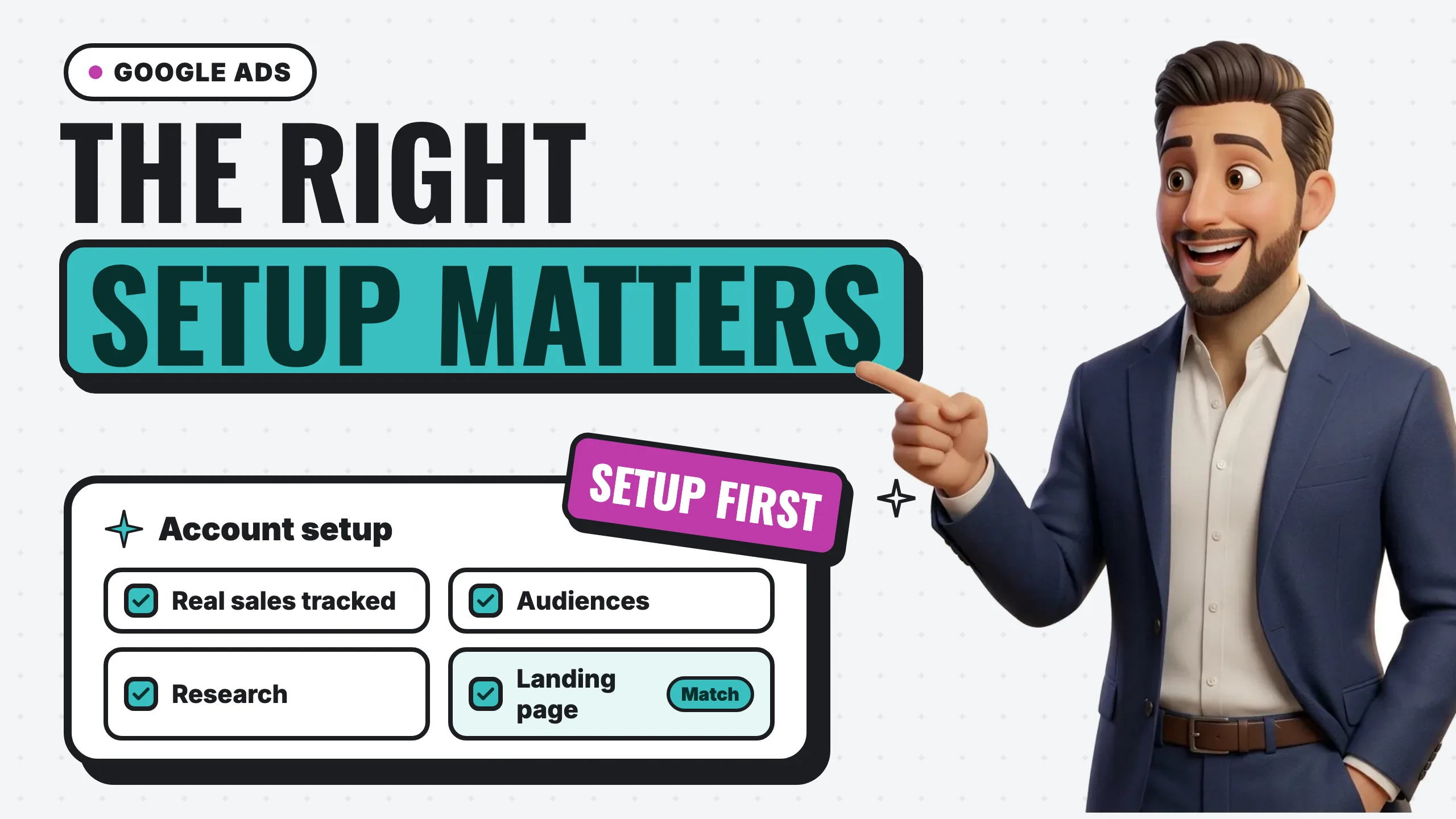
Google Ads works for a small business when the account is set up to learn from real results. That means tracking actual sales and qualified calls (not just clicks), feeding Google the right audiences, retargeting people who already visited, researching who buys and when, and sending every ad to a landing page built for that exact search. Clicks are easy to buy. Customers come from the setup around them.
We just finished building and tuning a Google Ads account for a client with a seasonal business that sells online and takes calls, and the live numbers moved the way we hoped: steady clicks at a reasonable cost, and tracked sales value well above what the ads cost. None of that came from a bigger budget. It came from the setup, the cleanup and the weekly optimization described below. We are keeping the client private (you can see the live account chart further down), and this post sticks to the method, which carries over to almost any local business.
Key takeaways
- Google’s bidding only learns from the conversions you mark as Primary. Secondary actions are “for observation only” and are not used for bidding (Google Ads Help). Count the wrong thing and Google gets very good at the wrong thing.
- Landing page experience is one of the three parts of Quality Score: “how relevant and useful your landing page is to people who click your ad” (Google Ads Help).
- Results vary a lot by industry. In LocaliQ’s 2026 search benchmarks, average cost per click ran from $1.63 to $9.87 and average conversion rate from 2.64% to 16.22% (LocaliQ).
- Retargeting and audience lists let you “re-engage people who have previously interacted with your brand” (Google Ads Help), which in our experience is the cheapest second chance at a sale.
- Setup is never finished. Weekly checks on search terms, schedules, budgets and ad messaging are where a good account becomes a profitable one.
Why setup matters more than budget
Most small businesses that tell us “Google Ads doesn’t work for us” have a setup problem, not a budget problem. The pattern is familiar: a campaign launched in an afternoon, a conversion tag that counts page views or add-to-carts as wins, every ad pointing at the home page, and no one reading the search terms. Google spends the budget exactly as instructed. The instructions were just wrong.
Modern Google Ads is built around automated bidding. You tell Google what a success looks like, and it bids more for people likely to produce that success. That is powerful when the signal is clean and expensive when it is not. Google’s own help center is direct about it: Primary conversion actions are “reported in the ‘Conversions’ column in your reports and used for bidding,” while Secondary actions are “used for reporting in the ‘All conversions’ column in your reports, but not for bidding” (Google Ads Help).
So the first job is not writing ads. It is deciding, carefully, what Google should chase.
Every industry is different, but the method is the same
A plumber, a dentist and a tax preparer all pay different prices for a click and convert at different rates. LocaliQ’s 2026 benchmarks, built from thousands of customer campaigns across Google Ads and Microsoft Ads, show how wide the spread is (LocaliQ, May 2026):
| Industry | Avg. cost per click | Avg. conversion rate | Avg. cost per lead |
|---|---|---|---|
| All industries | $5.42 | 8.18% | $66.69 |
| Attorneys & Legal Services | $9.87 | 5.55% | $131.63 |
| Home & Home Improvement | $8.33 | 8.05% | $90.92 |
| Dentists & Dental Services | $8.00 | 10.67% | $72.97 |
| Automotive Repair, Service & Parts | $4.35 | 15.51% | $29.96 |
| Finance & Insurance | $3.39 | 2.64% | $74.44 |
| Restaurants & Food | $2.05 | 8.05% | $30.57 |
Two things stand out. First, a cheap click is not a cheap customer: Finance & Insurance has one of the lowest click costs on the list and still lands near the average cost per lead because so few clicks convert. Second, these are averages across many advertisers, so your own numbers will differ. That is exactly why the setup below starts with research and tracking. You cannot optimize toward a benchmark. You can only optimize toward what your own tracking says is working.
The good news is that the method does not change between industries. Research, tracking, audiences, landing pages and weekly optimization apply to a roofer, a boutique and a tax office the same way. Only the inputs change.
1. Start with research, not keywords
Before building a single campaign, answer four questions:
- Who actually buys? Look at your real customer list: where they live, what they bought, what they asked before they bought. If you have not done this in a while, our guide to buyer personas and customer research walks through it.
- Where are they? Target the areas that produce customers, not the whole state. Google’s location settings also let you reach only people physically in your target area, which Google suggests when “you only want to target users in specific locations” (Google Ads Help). For a local service business, that one setting can save a lot of wasted spend. If some areas never buy (or you cannot serve them), exclude them.
- What language do they search in? If a meaningful share of your customers search in Spanish, they deserve Spanish ads, Spanish images and Spanish landing pages, not a translated afterthought. Each language should have its own ad text and its own page.
- When do they buy? Purchases and calls cluster at certain days and hours. Ad scheduling lets you “specify certain hours or days of the week when you want your ads to show” and adjust bids by time (Google Ads Help). Once you have a few weeks of data, a day-and-hour analysis shows where money is being spent while nobody buys.
Also look at what competitors in your field keep advertising. In our experience, offers that run for months are usually working. That research is the part no automated setting can do for you.
2. Track real results, not activity
This is the step that decides everything else. Good tracking for a small business usually means:
- Purchases with revenue if you sell online, sent from your store to both Google Ads and Google Analytics, so Google knows which clicks turned into money and how much.
- Phone calls from the ads, and taps on the call button on your website, counted only when they are long enough to be a real conversation.
- Qualified form leads, not every form view or page visit.
- Everything else as Secondary. Add-to-carts, page views and scroll depth are useful to watch, but if they are Primary, Google will happily optimize for people who browse and never buy.
Google also offers enhanced conversions, a feature that “can improve the accuracy of your conversion measurement” and “unlock more powerful bidding” (Google Ads Help). It is worth turning on for most accounts.
Then check the numbers against reality. Pull your actual sales records for a period and compare them with what Google Ads, Google Analytics and any social ad platforms claim. Every platform likes to take credit, and they rarely agree. A tracking audit that lines them up against real sales is how you catch double counting, missing purchases and conversions that fire on the wrong page. In our client’s account, that cleanup alone changed what Google was optimizing for: only real purchases and qualified calls count as wins now.
If you also run Meta ads, the same rule applies there. Meta’s Conversions API connects your marketing data “from an advertiser’s server, website platform, mobile app, or CRM to Meta systems” (Meta for Developers), so sales are still recorded when a browser blocks the pixel. Clean tracking across your website, Google and social media means every platform learns from the same truth. For a related Meta setting that rewards clean events, see Meta’s qualified leads optimization. And if you are not sure how to read the reports once tracking is in place, start with our lesson on how to read Google Analytics.
3. Build audiences and retargeting
Most people do not buy on their first visit. Audiences give you a second chance at the people who were closest to buying.
Google calls these “your data” segments (formerly remarketing). They let you “re-engage people who have previously interacted with your brand or services,” including segments like people who added items to a cart but did not buy (Google Ads Help). In the accounts we manage, a small remarketing campaign aimed at recent site visitors is one of the most efficient pieces, because those people already know you.
The same lists do double duty in Performance Max, Google’s campaign type that runs across Search, YouTube, Display, Gmail and Maps. There, audience signals “help Google AI optimize for the goals you select,” with the note that Performance Max “may show ads to relevant audiences outside of your signals if they have a strong likelihood of converting” (Google Ads Help). Website visitors and customer lists are strong starting signals: they tell Google what a likely buyer looks like.
On social media, the playbook is similar. Cart abandoners and recent visitors can be retargeted on Facebook and Instagram with a small daily budget, as long as the tracking from step 2 is clean enough to build the list. The point is to follow up with people across the places they actually spend time, which is rarely just Google. We cover that bigger picture in search everywhere optimization.
4. Send every ad to the right landing page
An ad makes a promise. The landing page has to keep it.
Google rates landing page experience as part of Quality Score, judging “how relevant and useful your landing page is to people who click your ad” (Google Ads Help). In practice, that means:
- One page per offer. Someone who clicked an ad about a specific service should land on that service, not your home page.
- Same words as the ad. If the ad mentions a deadline, the page headline should say it too.
- Same language as the ad. Spanish ads go to Spanish pages. Mixing them loses people in the first second.
- One clear next step. A buy button, a call button or a short form. Not five of them competing.
- Fast on a phone. A slow page burns clicks you already paid for.
Our list of website features that convert visitors into customers covers the page side in more depth, and making it easy for customers to reach you covers the contact options.
5. Choose campaign types that fit the goal
For most small businesses, a simple structure beats a clever one:
- Search campaigns for people actively looking for what you sell. You control the keywords and the ad text.
- Performance Max to reach people across all of Google, guided by your audience signals and your conversion tracking.
- A small remarketing campaign for recent visitors.
- A budget and an end date that match the offer. Seasonal and deadline-driven offers should stop when the season does.
Run each language as its own set of ads and pages, and keep budgets separate per offer so one campaign cannot quietly eat another’s money.
6. Optimize every week
Launch day is the starting line. The accounts that perform are the ones someone looks at every week. The routine we follow:
- Read the search terms. Add irrelevant searches as negative keywords, which “let you exclude search terms from your campaigns” (Google Ads Help).
- Use the day-and-hour data. In our client’s account, the analysis showed overnight hours were mostly wasted spend, so Performance Max no longer runs in the middle of the night.
- Show the call button only when someone can answer. A call that rings into an empty office is a lead lost after you paid for the click.
- Refresh the message when the situation changes. When a deadline approaches, ads that say so in plain words (in every language you run) give people a reason to act now.
- Watch spending pace. A campaign spending well under its budget is telling you something about reach, bids or targeting. One spending too fast needs tighter limits.
- Track the same numbers every time: spend, clicks, sales or leads, revenue, return on ad spend and calls, for each campaign. Judge changes against your own past results, not against a hunch.
What this looked like on a real account
Here is the setup on the account behind this post, with the client details left out:
- Research first: targeting built around the client’s top-buying regions and their real customer profile, with areas they do not serve excluded.
- Two offers, two budgets, two end dates, each with Search and Performance Max campaigns.
- English and Spanish throughout: separate ad text, images, videos and landing pages for each.
- Tracking audit and cleanup: purchases with revenue and phone calls counted as conversions, browsing noise moved out of the bidding goal, and the numbers checked against the store’s own sales records.
- Audiences: website visitor lists feeding a small remarketing campaign and guiding Performance Max.
- Tune-ups: an overnight pause based on the day-and-hour analysis, the call button limited to business hours, and refreshed deadline ads in both languages.
- Weekly checks on each campaign’s spend, sales, revenue, return on ad spend and calls, with a short watch list of what to look at next.
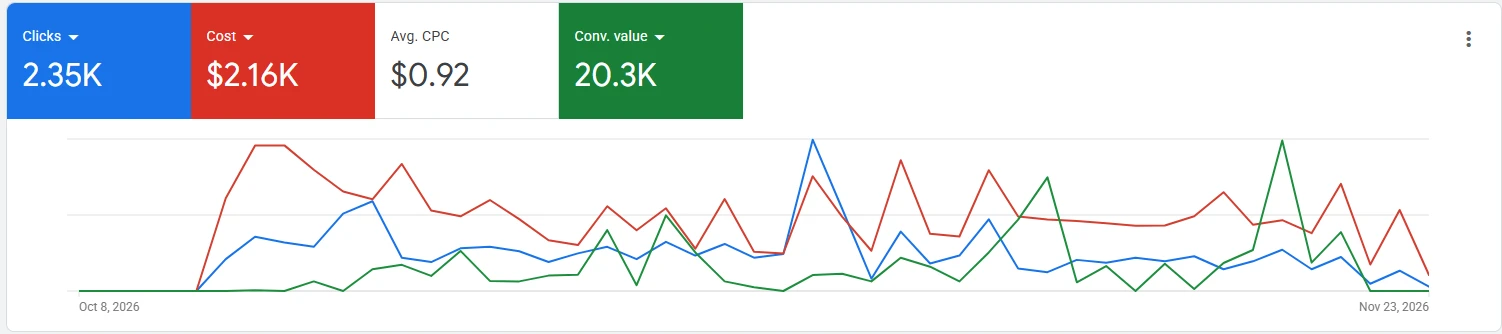
Live results from the account’s Google Ads overview, October 8 to November 23, 2026.
The result is an account where every optimization decision is made from real sales, and where tracked sales value comes in well above the ad spend. The same steps would look different in a different industry, with different keywords, audiences and pages, but the order would be the same.
A quick Google Ads setup checklist
| Area | Ready when |
|---|---|
| Research | You know who buys, where, in which language and at what times |
| Conversion tracking | Only purchases, qualified calls and real leads are Primary |
| Tracking audit | Ad platform numbers have been checked against real sales |
| Audiences | Visitor and customer lists exist and feed remarketing and Performance Max |
| Landing pages | Each ad goes to a matching page in the matching language |
| Campaign structure | Separate budgets per offer, with end dates for seasonal offers |
| Optimization | Someone reviews search terms, schedules, budgets and messaging every week |
Frequently asked questions
Is Google Ads worth it for a small business?
Usually yes, when people already search for what you sell and the account is tracking real sales or leads. It is rarely worth it when conversions are not tracked, because then neither you nor Google can tell which spend is working. Start with tracking, then judge the channel.
How much should a small business spend on Google Ads?
Work backward from your industry’s costs. With LocaliQ’s 2026 all-industry average cost per lead of $66.69 (LocaliQ), a budget that buys only a handful of leads a month gives Google very little to learn from. Look up your own industry’s cost per click and cost per lead, decide how many leads you need, and size the budget from that. Then let your own tracking replace the benchmark as soon as you have data.
Why are my Google Ads not converting?
The most common causes we see are tracking that counts the wrong actions, ads sent to a general home page instead of a matching landing page, targeting that is too broad (wrong areas, wrong hours, irrelevant search terms), and no follow-up for visitors who did not buy the first time. Fix them in the order of this post.
Do I need a separate landing page for Google Ads?
For each distinct offer, yes. Landing page experience is part of Quality Score (Google Ads Help), and a page that repeats the ad’s promise, in the ad’s language, with one clear action, converts better than a general page.
What is Google Ads remarketing?
It shows ads to people who already visited your website or interacted with your business. Google now calls these lists “your data” segments (Google Ads Help). It is usually a small campaign, and often an efficient one, because it reaches people who already know you.
The bottom line
Google Ads rewards the businesses that set it up to learn from real customers. Research who buys, track only real results, build audiences and retargeting, match every ad to the right page, and look at the account every week. The numbers will differ by industry. The setup that produces them does not.
Want us to set up or clean up your Google Ads? We build and manage Google and Meta campaigns for local businesses, with tracking done right from day one. Everything is priced on our pricing page. If you are also weighing newer channels, here is our take on ChatGPT Ads for local business.