It’s Friday afternoon, you’re on a job, and you just decided to close early for the holiday. Your website still says you’re open. You can email us and we’ll update it, same as always.
Or now, you can open ChatGPT and make that change yourself in a minute.
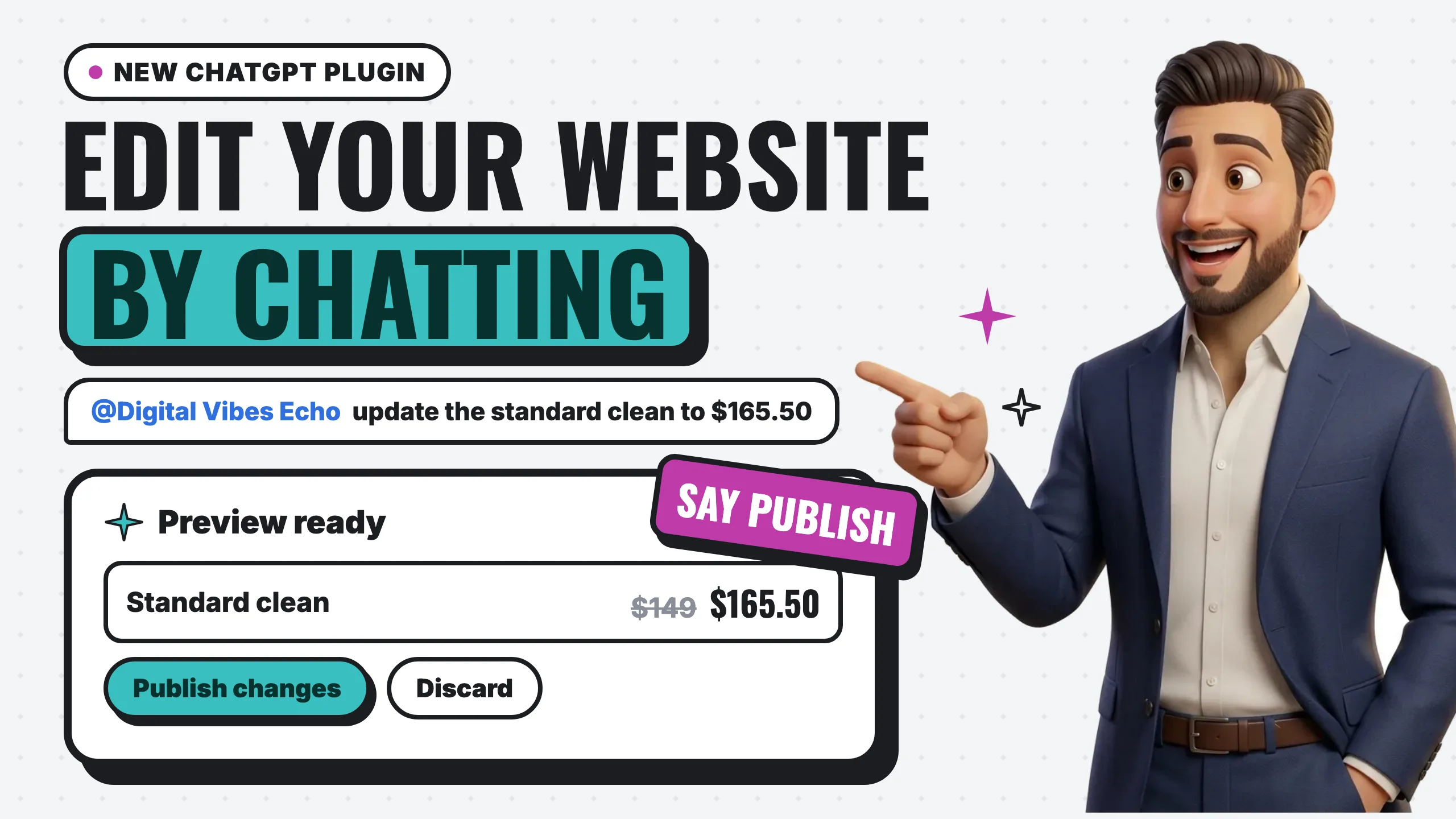
The short answer: to edit your website with ChatGPT, install the Digital Vibes Echo plugin once, sign in with the email we have for your site, then type @Digital Vibes Echo in any chat and ask for the change. Echo saves it as a private draft and shows you a preview. When you say “publish,” your website updates in a minute or two. It’s included with every Digital Vibes website plan.
Here’s the real thing, recorded on a demo website: a price change asked in ChatGPT, the preview, then Publish.
What is Digital Vibes Echo?
Digital Vibes Echo is a ChatGPT plugin that edits your own website. OpenAI approved it for ChatGPT’s plugin directory on October 30, 2026. You can open it here: Digital Vibes Echo in ChatGPT.
It connects to one thing: the website we built for you. It reads what’s on your pages, makes the change you ask for, and keeps every change private until you approve it. You don’t learn a website builder, and you don’t need to know where anything lives. You describe the change the way you’d tell a person.
It also meets you where your customers already are. BrightLocal’s Local Consumer Review Survey 2026 found that use of ChatGPT and other generative AI tools for local recommendations rose from 6% to 45% in a single year. Plenty of owners already have ChatGPT open during the day. Now it can update their website too.
How to set it up (one time)
You connect once. After that, every edit is just a chat.
- Open the plugin link and sign in to ChatGPT if it asks: Digital Vibes Echo.
- Click Install plugin.
- Sign in with your email. Use the email we have on file for your website and click Continue with email. If it asks for a password, choose Email sign-in code instead. Enter the one-time code we email you, then click Allow.
- Start a chat. Type @, choose Digital Vibes Echo, and ask “What’s on my website?”
Our setup guide with screenshots walks through each screen, for ChatGPT and for Claude.
How each edit works: ask, preview, publish
Every change follows the same three steps, and nothing reaches your live website until the last one.
Ask. Write the change in plain words: “Change our Saturday hours to 9 to 1,” “Update the price of a standard cleaning to $165,” “Add a question to the FAQ about parking.” English or Spanish both work.
Preview. Echo saves the change as a private draft and shows a preview card with what changed, before and after, plus links to see the page in English and Spanish. The preview link works for 48 hours.
Publish. When it looks right, say “publish” or click Publish changes on the card. Your website shows the update in a minute or two. Changed your mind instead? Click Discard and the live site stays exactly as it was.
If you publish something and then want it back, ask Echo to undo your last publish.
What you can change yourself
For basic everyday updates, you can now do it yourself:
- Business info: hours, holiday closures, phone number, address and your online booking link
- Words: headlines, paragraphs, buttons and menu names
- Photos: swap a photo by attaching it in ChatGPT, uploading it from your phone, or using a link
- Sections: add a service, an FAQ question or a review, or move and remove sections
- Both languages: change the English and Echo writes the Spanish (or the other way around), and shows you both before saving
What stays with us
Some things are locked on purpose: your brand colors, fonts, SEO titles and the website’s code. If you ask Echo for one of those, it politely tells you Digital Vibes handles it.
That’s the point of the setup. You get a unique website built by a professional, and the freedom to handle the small stuff on your schedule. Design, SEO, new pages and anything technical stay with us, and you can still email us any change, big or small. Owners who build their own sites spend a lot of time on exactly that part, as we covered in the hidden cost of DIY websites.
Does it work in Claude too?
Yes. In Claude, Echo is a connector instead of a plugin. You add it once in Claude’s Connectors settings and sign in with the same email. Every edit works the same way: ask, preview, publish. The setup guide has the Claude steps.
Frequently asked questions
Does Digital Vibes Echo cost extra?
No. It’s included with every Digital Vibes website plan: Starter Presence, Local Pro, Online Store and AI Concierge. It isn’t sold on its own, because it edits websites we build and manage. See the plans.
Can I break my website by editing it in ChatGPT?
Every change is a private draft until you publish it, the design pieces are locked, and you can undo your last publish. The worst case for a typo is a preview you discard.
What if my website isn’t set up for editing yet?
We’re moving client websites onto the editor now. When yours is ready, you’ll get an email from us with your sign-in steps. Until then, nothing changes about how you reach us.
Can I write my changes in Spanish?
Yes. Write in Spanish or English. Echo answers in the language you write in and keeps both versions of your website in step.
Do I need to know how my website is built?
No. Ask “What’s on my website?” and Echo lists your pages and sections. From there, just describe what you want changed.
The bottom line
We still build, manage and update your website, and that doesn’t change. Digital Vibes Echo adds the flexibility to make basic edits yourself from ChatGPT in a minute, from anywhere.
Want to see the full feature list? Visit edit your website by chat, read how our managed websites work, or chat with Echo about getting a website that includes it.