Setup guide for Digital Vibes clients
How to Connect Your Website to ChatGPT and Claude
You connect once by adding Digital Vibes Echo, our website editor, to ChatGPT or Claude and signing in with the email we have on file for your website. After that, you update the simple things on your site by asking in plain English or Spanish, and you approve every change before it goes live.
Can I update my website from ChatGPT or Claude?
Yes, for simple updates. Ask Echo to swap a photo, change a paragraph, update your hours or contact details, or add a service, FAQ question or review. Each change becomes a private draft with a preview link, and it goes live about a minute or two after you say "publish".
It is not a website builder. Your design, SEO and Google rankings, page titles and code, new pages and layout changes all stay with us.
What do I need before I connect?
- A Digital Vibes website that is set up for editing. If yours is not ready yet, we will email you when it is.
- A ChatGPT or Claude account.
- The email we have on file for your website. Only that email can sign in.
- For Claude only, the connector address: https://edit.digitalvibes.design/mcp
How do I connect my website to ChatGPT?
Install Digital Vibes Echo from ChatGPT's plugin directory, then sign in with your email. Four steps, once.
- 01
Open Digital Vibes Echo in ChatGPT
Open this link and sign in to ChatGPT if asked. It opens the Digital Vibes Echo page.
Open Digital Vibes Echo in ChatGPT - 02
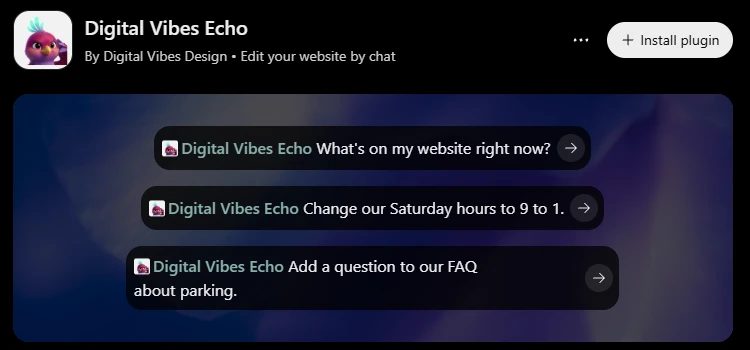
Click Install plugin
The Install plugin button is at the top right of the Digital Vibes Echo page.
- 03
Sign in with your email
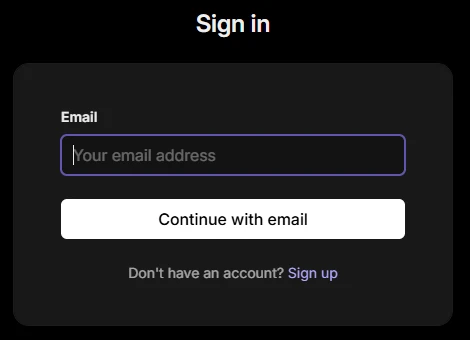
A sign-in page opens:
- Enter the email we have on file for your website and click Continue with email. It must be that email.
- If it asks for a password, click Email sign-in code instead.
- We email you a one-time code. Enter it on the sign-in page.
- When asked, click Allow so ChatGPT can reach your website.
- 04
Start a chat with Digital Vibes Echo
In a new chat, type @, choose Digital Vibes Echo and ask: "What's on my website?" Here is a real edit in the ChatGPT phone app, from request to Publish:
How do I connect my website to Claude?
Add Echo as a custom connector in Claude, then sign in with your email. Four steps, once.
- 01
Open Connectors
Go to claude.ai and open Customize, then Connectors.
- 02
Add a custom connector
Click "Add custom connector". Name it Echo and paste the address below.
https://edit.digitalvibes.design/mcp - 03
Connect and sign in
Click Connect and sign in with the email we have on file for your website. We email you a one-time code to enter.
- 04
Turn it on in a chat
In a new chat, turn on Echo under + > Connectors and ask: "What's on my website?"
ChatGPT or Claude: what is different?
Both work the same way once connected. The setup menu and photos are the main differences.
| Topic | ChatGPT | Claude |
|---|---|---|
| Where you add it | Open the Digital Vibes Echo link, then Install plugin | Customize > Connectors > Add custom connector |
| Sign-in | Your email + one-time code, then Allow | Your email + one-time code |
| Adding a photo | Attach it in the chat, or use an upload link | Use the private upload link Echo gives you |
| Preview and publish | Private preview link, then say "publish" | Private preview link, then say "publish" |
What should I ask first?
Start with "What's on my website?" so Echo reads your pages, then ask for one change at a time.
-
See what is on your site
"What's on my website?"
-
Change your hours
"We're closed Monday for the holiday."
-
Swap a photo
"I want to replace the photo at the top of my home page."
-
Fix a paragraph
"Make the intro on my home page shorter."
-
Add an FAQ
"Add a question about parking to my FAQ."
What can the AI see and change?
Only your own website's content: its pages, text, photos and business details. It can change simple content, and only as a private draft you approve. It cannot touch your design, SEO, page titles, code, other pages you do not own, or anyone else's website.
Is it safe to connect my website to an AI assistant?
Yes. Only the email we link to your website can sign in, and knowing that address is not enough: you sign in with a one-time code sent to that inbox. Nothing goes live until you say "publish", and you can undo your last publish anytime.
Why isn't my connection working?
It says it can't find my website
You probably signed in with a different email. Disconnect Echo, connect again, and use the email we have on file for your website. If you are not sure which one that is, ask us.
My website isn't set up yet
We are moving client websites onto the editor now. If yours is not ready, you will get an email from us when it is, with your own sign-in steps.
ChatGPT or Claude asks me to sign in again
That is normal from time to time. Repeat the sign-in step with the same email and the new one-time code.
Nothing happens when I ask for a change
Make sure Echo is turned on in that chat. In ChatGPT, type @ and choose Digital Vibes Echo; in Claude, open + > Connectors and switch it on.
I never got the one-time code
Check your spam folder. If it is not there, start the sign-in again to get a new code.
Still stuck? and we will set it up with you.
FAQ about connecting your website to ChatGPT and Claude
Do I need a developer to connect it?
No. It is a one-time setup you can do in a few clicks, and we can set it up with you if you prefer.
Can the AI change my design or SEO?
No. The editor only reaches simple content like photos, text, hours and contact details. Design, page titles, SEO, pages and code are locked and stay with us.
Will anything go live without me?
No. Every change is a private draft with a preview link. Nothing goes live until you say "publish", and you can undo your last publish.
Can someone else edit my website?
Only the email we link to your website can sign in, and knowing that address is not enough: you sign in with a one-time code sent to your inbox.
Is it included in my plan?
Yes. AI editing is included with every new Digital Vibes website plan at no extra cost.